⚠️Important Notes
•Don't Change Element Positions
When working on 2x versions, always use the provided X2 assets from the download pack. Do not resize assets manually, as it can cause misalignments. Keep the anchor point and element placement consistent across all versions.
•Importing GIFs or Spritesheets to Piskel
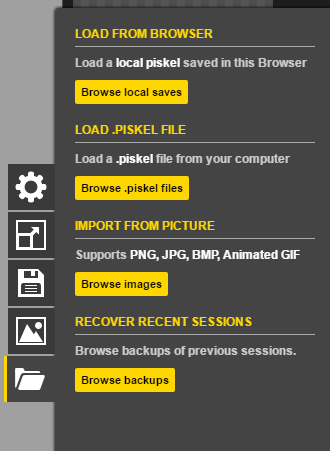
When you import a GIF or spritesheet, Piskel will automatically import all frames. Use the import option shown below:
•Export as GIF for Tournament Submission
Make sure to export your work as GIFs when submitting to tournaments. All GIFs must be exported at x1 scale (You can work with sprite sheets, but you need to export as GIFs so use the sprite to GIF tool ).
🚨CRITICAL: DO NOT RESIZE ASSETS
Do not resize the GIFs or spritesheets when submitting to tournaments. Use the exact dimensions provided in the asset pack.
All GIFs must be exported at x1 scale. If you work with spritesheets, you must use the Sprite to GIF tool to convert them before submission.
Getting Started with Piskel
Setup
- 1.Visit PiskelApp.com/download and download the Piskel app.
- 2.Download the assets and import them into Piskel
- 3.Create Layers for complex components
Export
- •Export as PNG and many other formats
- •Built-in frame/animation support
- •Completely free and open-source
🚫 No Resizing Allowed
Always use the provided assets at their original size. Resizing will break in-game integration.
🚀 Working at 2x (Recommended for Complex Animations)
If you need more space for detailed movement or effects, use the 2x workflow. Import the X2 version of the base template from the provided assets folder—this gives you a high-resolution workspace pre-aligned for the game engine.
Component Guidelines
Ship Hull
The main body of the ship. You need to create 3 states: Idle, Hit, and Destroyed.
The main body of the ship. You need to create 3 states: Idle, Hit, and Destroyed.
Standard Steps- Idle
- 1Import frames from GIF or sprites from folder
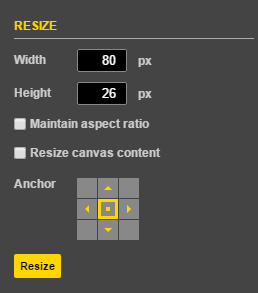 Piskel Screenshot
 - 3Export at 3x scale
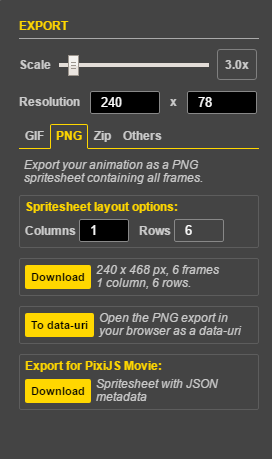 Piskel Screenshot
 - 4Also Export as GIF (make sure its at x1 scale)
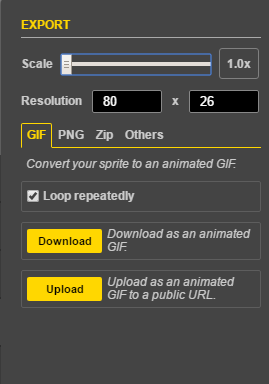 Piskel Screenshot
Universal Rules
- No anti-aliasing or blurry edges (pure pixels only)
- Users can use any colors they want
- Themes are open and generally based on individual tournament requirements
- Export as GIF at x1 Scale Only (No Resizing)
- Work with GIFs or Spritesheets (convert spritesheets to GIF for submission)
- Keep file sizes optimized
- Original work only (no AI or plagiarism)